For Aspiring Children’s Book Authors and Illustrators Using AI

Give Your Books a Style Readers Recognize as Yours

Develop your own visual signature even if you aren’t artistic or confident using image prompts.

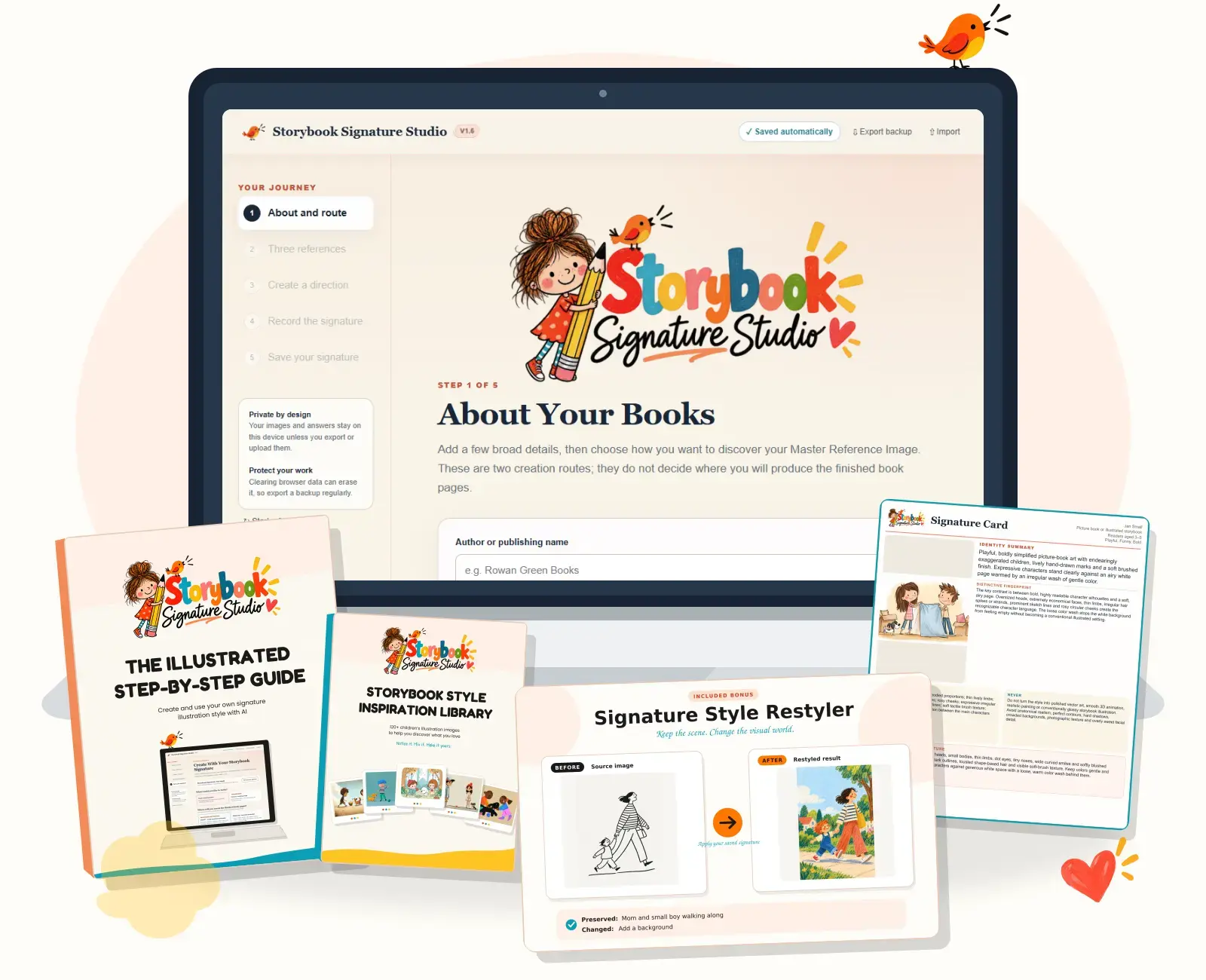
Storybook Signature Studio shown on a laptop with the illustrated guide, Inspiration Library, Restyler example and a finished Signature Card

You Made the Book and It Was Good But…

Your Book Looks Just Like Thousands of Other AI-Generated Books

You bought the storybook prompts and were amazed by how quickly AI turned your idea into a real children’s book.

But then you noticed that the illustrations had the same familiar “whimsical storybook” look you had seen again and again. The book was finished, but how would it stand out?

Popular children’s books each have their own distinct look. You can recognize a Dr. Seuss or Beatrix Potter book from the illustrations alone.

Your books don’t have to look like every other AI-generated book.

They can have a visual identity that feels recognizably yours too.

Stop Letting AI Choose Your Illustration Style for You

Meet Storybook Signature Studio

Storybook Signature Studio is a private browser-based program that guides you through creating an original visual signature for your children’s books, without asking you to draw a thing.

You begin by exploring illustration ideas and noticing what catches your eye. The Studio helps you combine those preferences into a clear visual direction, create one image that defines the new look, and produce reusable instructions that carry it into new scenes.

This is a style-development process, not another fixed prompt list.

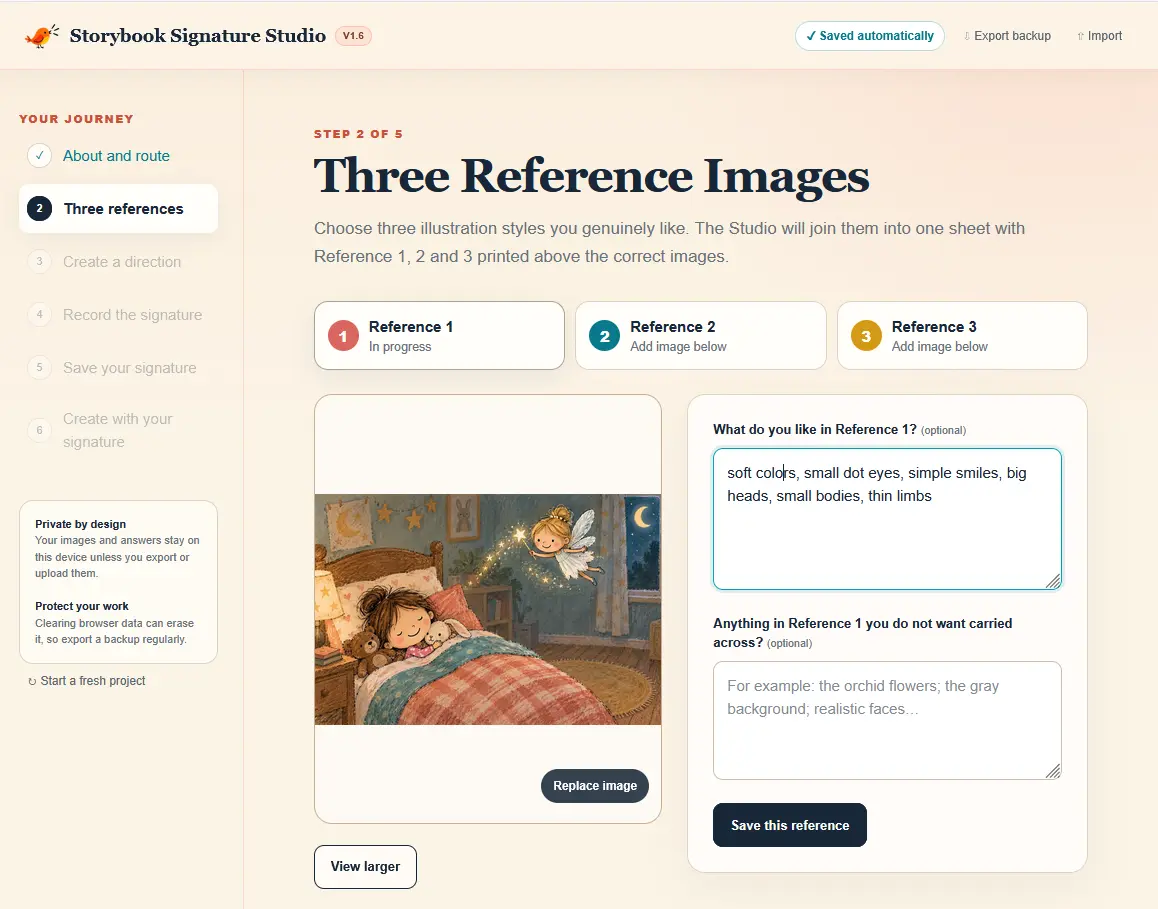
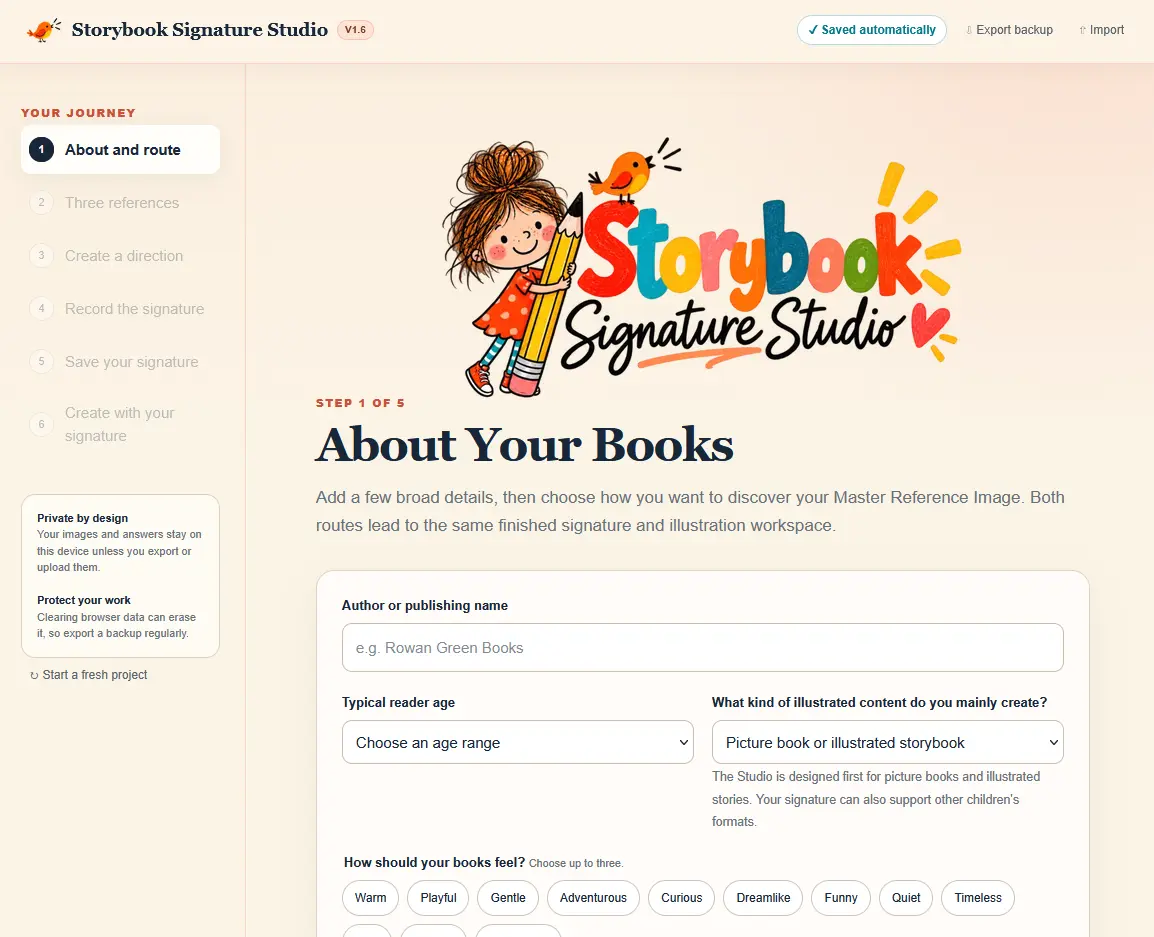
The first step of Storybook Signature Studio, where a children’s book creator begins defining the book and signature
The Studio screen for choosing three illustration images and recording liked and disliked details
Notice the qualities you like—not complicated art terminology.
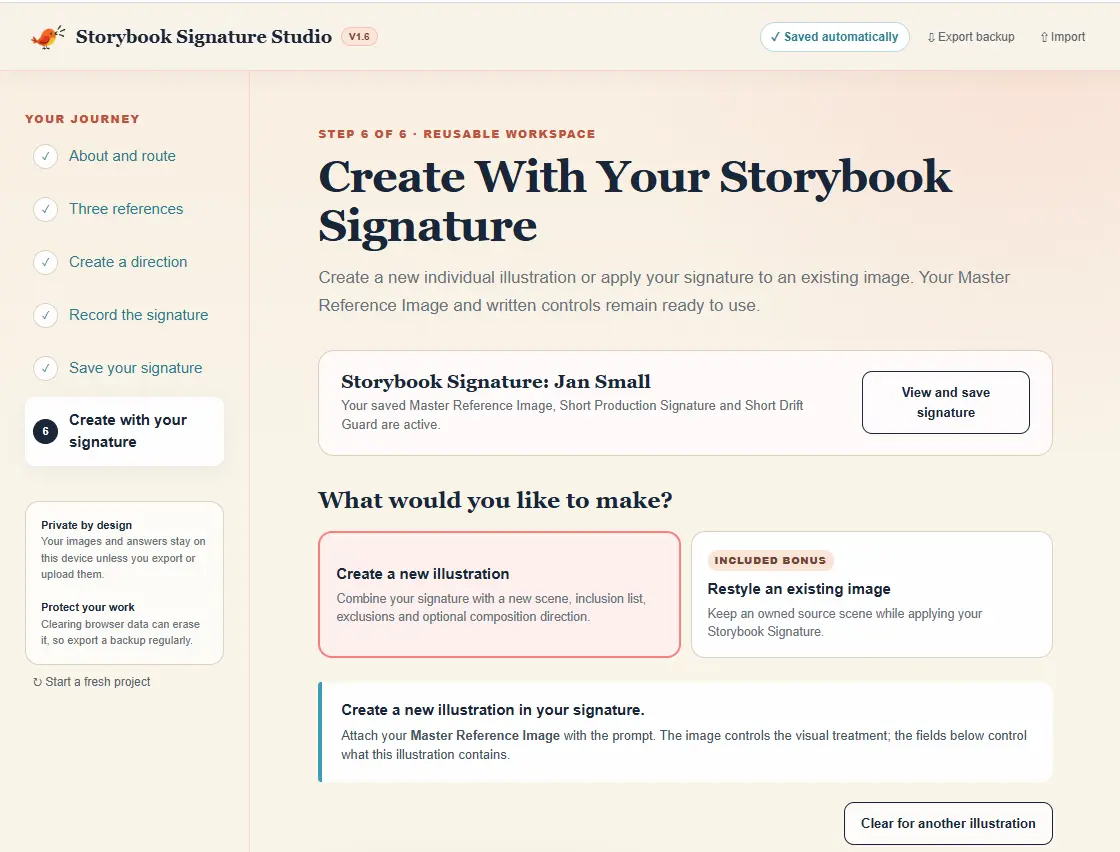
The Studio workspace for creating new illustrations or restyling an existing image
Keep your saved signature ready for every new book scene.

Make It Yours—Then Keep Exploring

Create, Experiment and Come Back Whenever You Like

Storybook Signature Studio does not require an API key, charge credits or add another monthly subscription to your business. The Studio places no limit on how many signatures you can create, so you can develop different looks for different books and series.

Your chosen AI platform may apply its own subscription costs or image-generation limits. The recommended workflow uses ChatGPT. Midjourney is optional.

Beyond the Usual Style Prompt

“Make It Whimsical” Isn’t a Visual Identity

The Usual Way

  • Start with a fixed storybook prompt bought by hundreds of other creators.
  • Add broad words such as cute, magical or whimsical.
  • Experiment randomly and hope the next result feels more original.
  • Ask AI to copy a style you admire, bringing ethical and legal concerns.
  • Accept whatever visual treatment the generator chooses.

The Signature Studio Way

  • Explore a wide range of visual possibilities before choosing.
  • Notice the shapes, textures, colors and character details you like.
  • Combine those preferences into an original visual direction.
  • Turn that direction into an approved Master Reference Image and clear production instructions.
  • Give AI the visual guidance and instructions it needs for every new illustration.

Created While Testing the Studio

See How Different Ideas Become Distinctive Visual Signatures

These examples show the actual journey, not a gallery of unexplained finished pictures.

01

Recommended Workflow

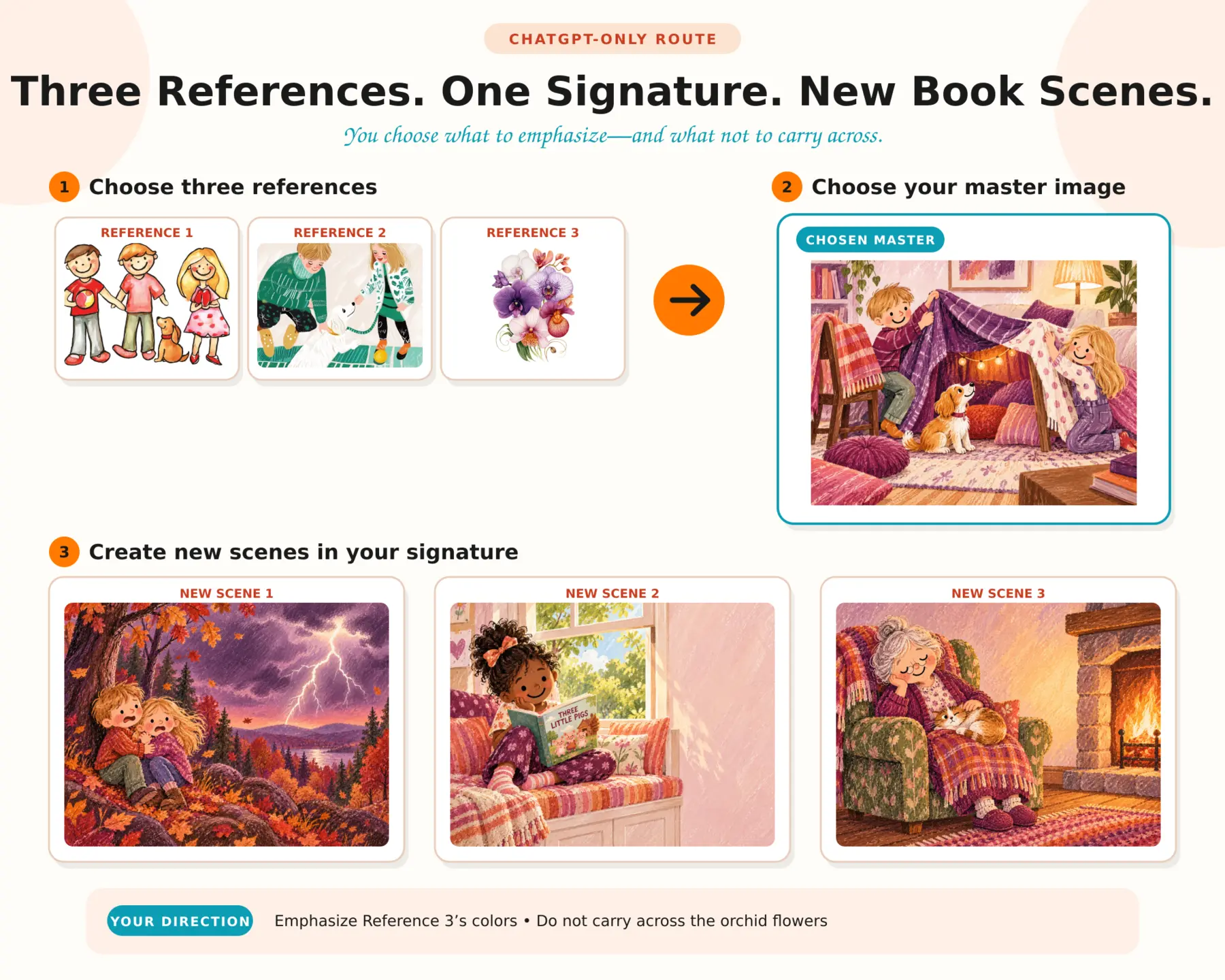
Created with ChatGPT

Three different starting illustrations becoming one Master Reference Image and three new scenes through the ChatGPT workflow

Three starting images contributed different qualities. ChatGPT helped combine them into a new visual direction, which was then used across several completely new scenes.

02

Optional Workflow

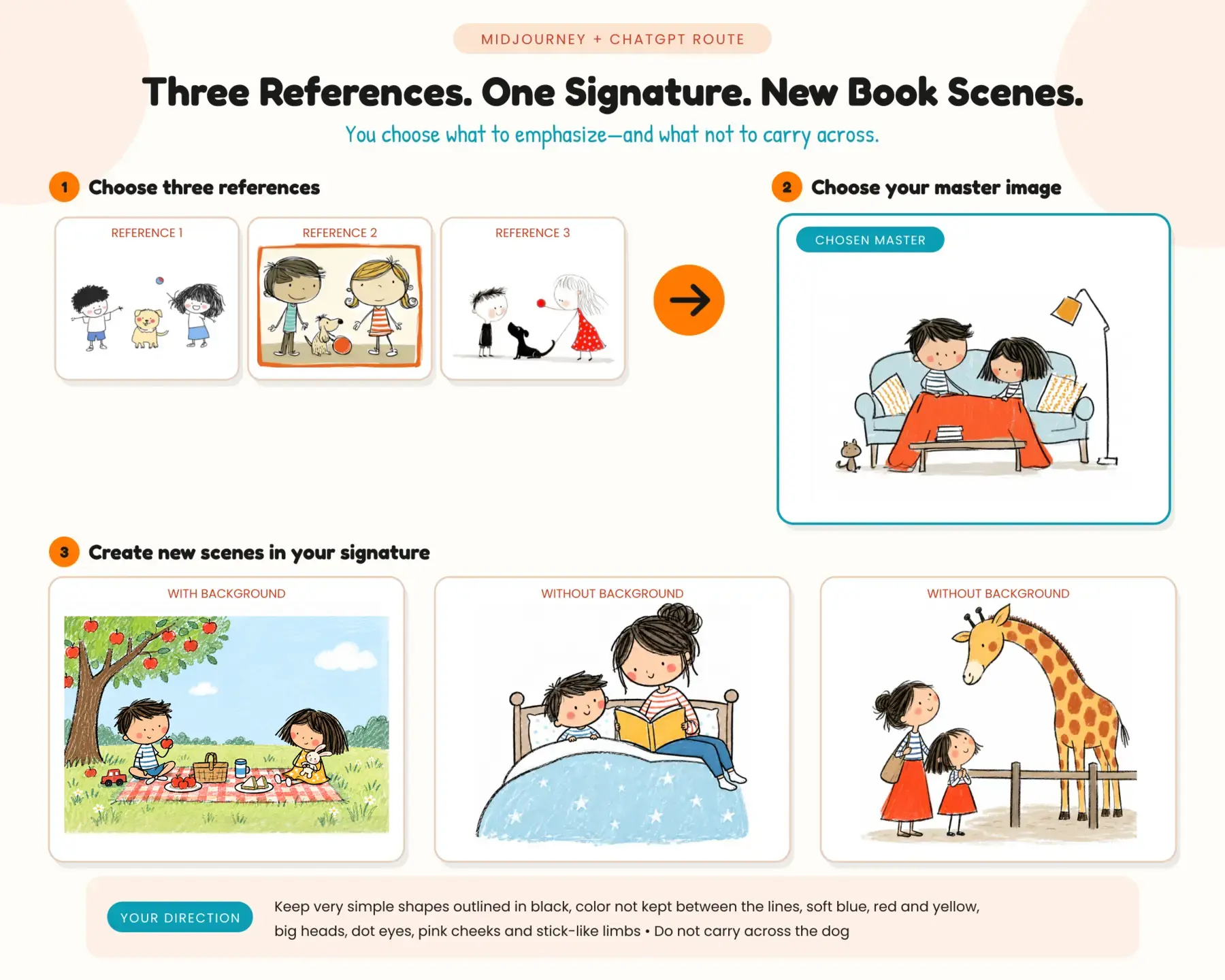
Explored with Midjourney, Continued in ChatGPT

Three starting illustrations explored in Midjourney, followed by a chosen Master Reference Image and new book scenes created with ChatGPT

Midjourney was used during the exploratory stage to discover a more unusual visual direction. The Studio includes an optional Midjourney exploration route, after which the chosen Master Reference Image is brought into ChatGPT to create the reusable Signature Record and production instructions.

These are examples we created while building and testing Storybook Signature Studio. AI-generated results naturally vary, so they show what the process can produce rather than guaranteeing an identical result from every generation.

Inside Storybook Signature Studio

From “What Do I Like?” to Illustrations That Belong Together

01

Storybook Signature Creator

The private browser program guides you from your first visual ideas to an approved Master Reference Image. It then helps you create a detailed Signature Record, Short Production Signature, Short Drift Guard and printable one-page Signature Card. ChatGPT is the recommended workflow, with an optional Midjourney route for exploring more unusual visual directions.

02

New Illustration Prompt Builder

Once you have your signature, use it inside the Studio to create unlimited book-page prompts with your signature built right in. Add the scene, essential details, exclusions, recurring-character information and any size or layout requests. The Studio combines them with your saved signature instructions into a ready-to-use prompt for each new illustration.

03

Easy Signature Saving

Your work is saved privately in your browser. Create different signatures for different books or series, export them for backup, and import them into another browser or device whenever you wish.

04

Short Quick Start Guide

Create your first signature without needing to read the complete manual before you begin.

05

Illustrated Step-by-Step Guide

Follow the complete process with screenshots, examples and extra guidance for getting stronger, more distinctive results.

06

Lifetime Access and Updates

Use the current Studio and guides for as long as you wish, with access to future product updates included.

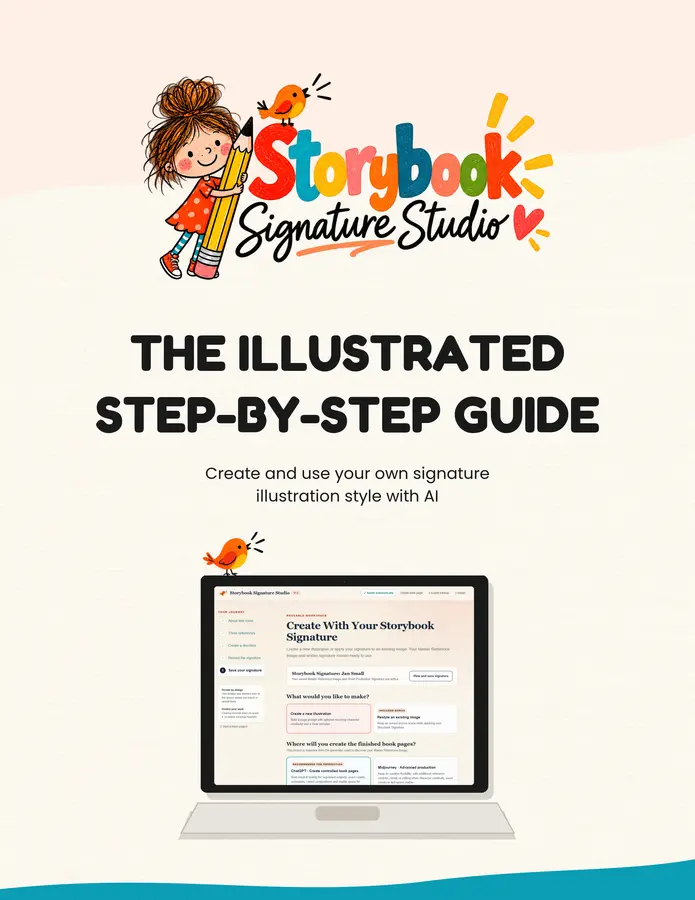
Cover of the Storybook Signature Studio illustrated step-by-step guide
Clear steps, screenshots and examples are there whenever you need them.

An Enjoyable Afternoon of Creative Discovery

Create Your First Signature in an Hour or Two. It’s Simple.

  1. 1

    Explore what catches your eye

    Use your own illustration images, the included Inspiration Library, or both. You don’t need to know illustration terminology—simply notice what you like and what you don’t.

  2. 2

    Create a possible visual direction

    Use the recommended ChatGPT workflow to combine your preferences into a genuinely different possibility. If you wish, you can use Midjourney during this early exploration stage.

  3. 3

    Choose the image that defines your new look

    Select the image that best captures the visual world you want to continue. Inside the Studio, this becomes your Master Reference Image—the visual authority for everything you create next.

  4. 4

    Turn it into reusable instructions

    The Studio creates the analysis prompt ChatGPT uses to document the important visual qualities and produce your complete Signature Record, Short Production Signature, Short Drift Guard and printable one-page Signature Card.

  5. 5

    Create new book illustrations

    Describe each new scene in the Studio’s prompt builder. Use the finished prompt with your Master Reference Image to create the new image in a matching style.

  6. 6

    Save it—or create another

    Export your completed signature for safekeeping. Keep one look across a series or create something completely different for your next book.

Two Useful Bonuses Included

More Ways to Find—and Use—the Look That Belongs to Your Books

Bonus One

Storybook Style Inspiration Library

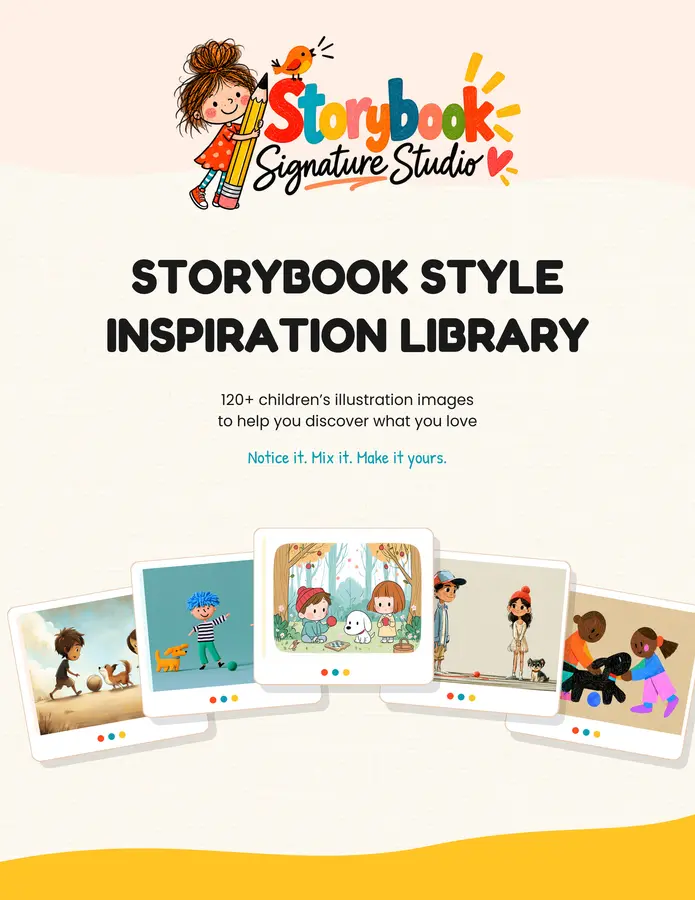
Not sure what you like? Explore more than 120 unique children’s illustration images created specifically for this product.

These are creative starting points, not ready-made signature styles. Choose and download the images that appeal to you, then use their shapes, textures, colors or character details as input to your own original direction.

Cover of the Storybook Style Inspiration Library featuring a varied selection of children’s illustration styles

Bonus Two

Signature Style Restyler

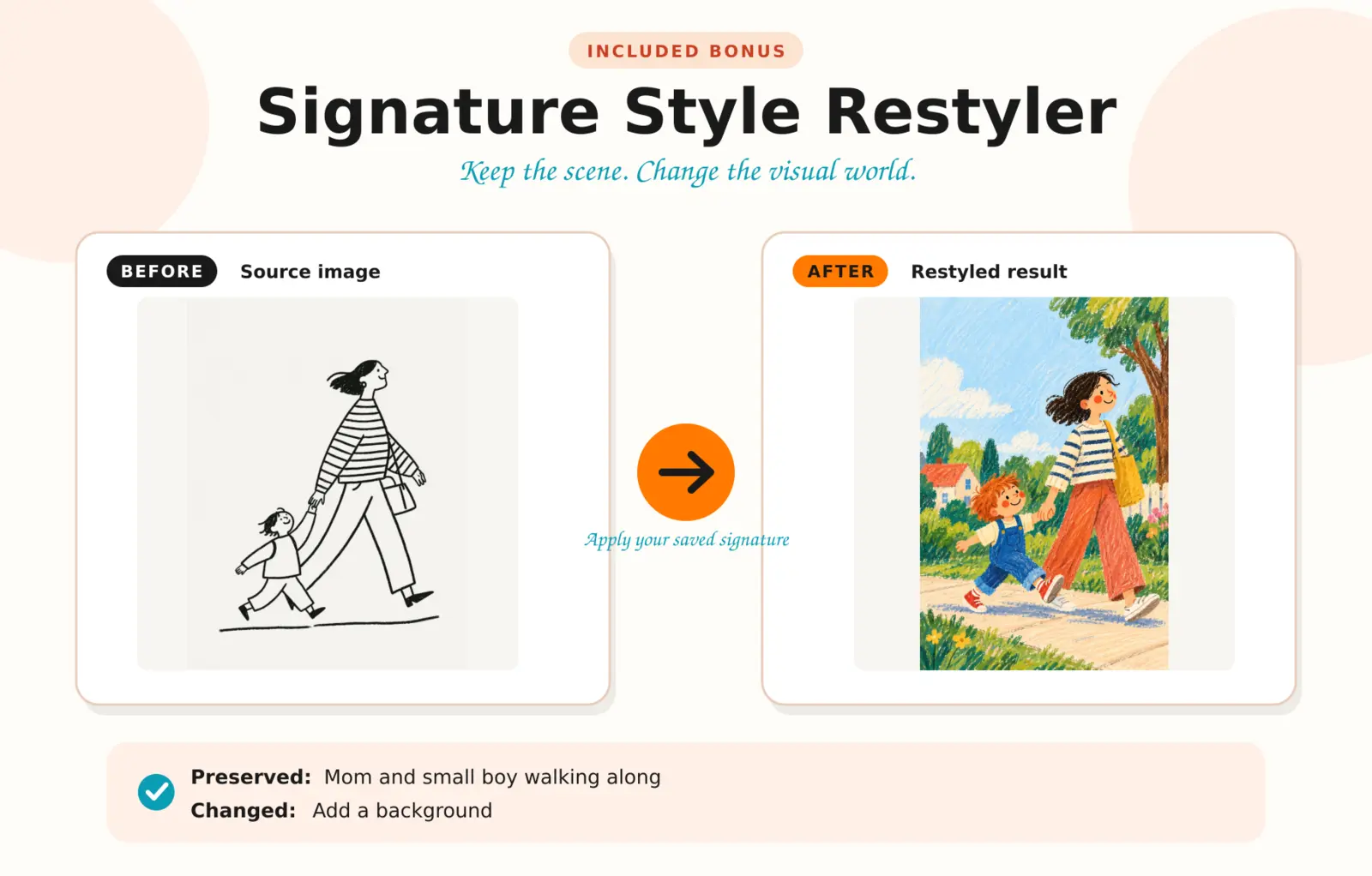
Already have an illustration you want to keep? The Restyler applies your saved signature while retaining the source characters, essential objects, action and story meaning.

You can protect particular details, request deliberate changes and specify any size or layout requirements.

Before-and-after example showing a mother and small boy walking, restyled with a colorful background while preserving the subjects and action
Preserved: Mom and small boy walking along. Changed: A background was added and the visual style transformed.

Your Complete Storybook Signature System

Give Your Next Book a Visual World of Its Own

  • Storybook Signature Creator
  • Complete Signature Record, Short Production Signature and Drift Guard
  • Printable one-page Signature Card
  • New Illustration Prompt Builder
  • Easy signature saving, export and import
  • Short Quick Start Guide
  • Illustrated step-by-step guide
  • Bonus: Storybook Style Inspiration Library with 120+ unique images
  • Bonus: Signature Style Restyler
  • Lifetime access and future updates
  • Helpful email support if you get stuck

One-Time Price

$57

Get Storybook Signature Studio

One payment. No monthly Studio charge.

Personal business use only. You may use the signatures, prompts and illustrations you create in books and products sold by your own business. Storybook Signature Studio and its contents are not PLR and may not be shared, redistributed or used to provide paid signature-creation services for clients.

A Few Things You May Be Wondering

Questions Before You Buy?

Do I need to be artistic?

Not at all. You don’t need to draw, paint or understand illustration terminology. Storybook Signature Studio helps you explore what you like and turn those choices into clear instructions for AI.

Do I need to be good at writing image prompts?

No. The Studio guides you through the choices and creates the prompts you need. You copy them into ChatGPT, or adapt them for another image generator if you prefer.

Is the Studio technical or difficult to use?

No. It is a private program that runs inside your web browser. The short Quick Start Guide helps you create your first signature, while the complete illustrated guide takes you through the recommended ChatGPT workflow step by step. It also explains how Midjourney may be used as an optional exploration tool.

How long will it take to create my first signature?

Allow around one to two hours. If you already know what you like, you may create your first signature in about an hour. If you want to enjoy exploring and comparing styles first, allow a little longer.

You can experiment as much as you like and create different signatures for different books or series. The Studio makes it easy to export and import them.

Does the Studio have any usage limits or monthly charges?

No. Storybook Signature Studio does not use an API, charge credits or add a monthly Studio subscription. You may create as many signatures and book-page prompts as you like.

Your chosen AI platform may have its own subscription costs or image-generation limits.

Do I need another paid AI subscription?

You need access to ChatGPT’s image-generation features to follow the recommended and tested workflow. Availability and usage limits depend on your ChatGPT plan, so you may not need another subscription if your current access already includes image generation.

Midjourney is entirely optional. If you choose to use it while exploring visual directions, you will need your own Midjourney subscription.

Can I use another AI image generator?

Yes. The Studio produces a detailed prompt that you may adapt for another image generator. However, the included instructions use ChatGPT because that is the workflow we have tested and know works.

Will my characters remain consistent throughout my book?

The Studio gives you a place to record recurring-character details and adds them to the relevant illustration prompts. For the strongest continuity in ChatGPT, create your book inside the same image conversation and continue using your character reference images, Master Reference Image and saved signature instructions.

This gives ChatGPT much clearer visual guidance and helps characters remain recognizably the same across different scenes. AI may still vary occasional details, so review each illustration and use ChatGPT’s editing tools when something needs correcting.

Am I limited to one signature style?

No. You can create as many signatures as you wish. You might choose one look for a funny picture-book series and something completely different for a gentle bedtime series. Your saved signatures can be exported and imported easily.

What rights are included?

Your purchase is for personal business use only. It is not PLR.

You may use the signatures, prompts and illustrations you create in books and products sold by your own business, subject to the terms of the AI platform you use. You may not sell, share, give away or redistribute Storybook Signature Studio, its guides, the Inspiration Library, the Restyler or any supplied files. You may not add them to PLR products, courses, memberships or bundles, or use the Studio to provide paid signature-creation services for clients.

What happens to the information I enter into the Studio?

The Studio runs privately in your browser and helps you build prompts to copy into your chosen AI platform. Your use of those prompts and images is then covered by that platform’s own privacy terms.

How will I receive the product?

You will receive PDF guides containing the access links and step-by-step instructions. Your purchase includes lifetime access to the current product and future updates.

Do you offer refunds?

As this is a digital product, I do not offer refunds. Please check this page carefully before buying. If you still have an unanswered question, please get in touch via our Contact page. Of course, if you have a problem with your purchase, get in touch there too. I’m always happy to help.
Your Stories Already Come from You

You Created the Book. Now Give It a Look of Its Own.

Your stories don’t need to disappear into a sea of familiar AI illustration. Spend an enjoyable hour or two discovering a visual direction you are proud to use—and give readers another reason to recognize your books.

Create My Signature Style

Get the complete Studio and both bonuses with one payment.